Showing posts with label gadgetguru. Show all posts
Toshiba Japan announced a new portable DVD player today [JP], the SD-P93DTW, which is equipped with a One-Seg digital TV tuner. The device is Japan-only at this point. But Toshiba sells the SDP93S in the US, which is essentially the same player minus the TV tuner (the tuner is useless outside Japan and Brazil anyway). And Americans have to pay a lot less for their player. Japanese buyers will be set back a whopping $520, while the SDP93S costs just $180 at Amazon. The Japanese version is also equipped with an analogue TV tuner and supports SD/SDHC/microSD/micro SDHC cards but apart from these features (the American version supports SD cards only), it seems to be the same model: a swiveling 9-inch TFT LCD screen with 800×480 resolution, DivX support, JPEG viewer, virtual surround sound and built-in speakers. The SD-P93DTW will hit Japanese stores at the end of April.

When camping with the whole family, it can present some slight lighting issues. There are of course always ways around that, but it usually means packing four different kinds of lights and plenty of flashlights as well as batteries. Well Coleman, being one of the better brand names for camping, has come up with a different solution. It offers one giant lantern that will give light in all directions for when you’re all sitting together, but an extra perk for when you go off in different directions.
The side panels, of which there are four, all snap off. They can work individually or all together once put back on the lantern. Each individual panel has a recharageable NiMH battery, those charge off of the eight D-cell batteries that are located within the base of the lantern. Those batteries can run the lantern all together for 72 hours, a full charge of the panel will give an hour of light per panel. Due to the frosted lens and wide-angle LED lights, it will give off light over a large area. You can purchase it on the Sears website for $69.99.
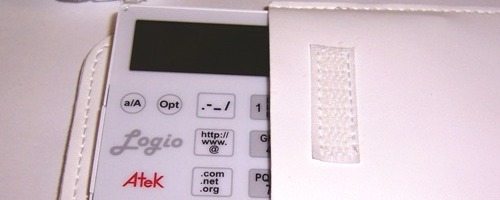
Security is important to all of us and when it comes to technology our passwords are often a critical component. Everyone knows that our passwords are only as good as we make them. It is crucial that a password is not easy to guess. No names, birth dates, need to use both upper and lower case letters, numbers and special characters.
The problem is how do we remember them all because if you have a complex password written on a post-it hid under your keyboard, what good does that do. Personally, I have a lot of different passwords for different web applications and databases. The only reason I still use my decade old Palm V is because it has a reliable password application called Keyring. Maybe it is time for me to finally retire my Palm V.
Today I am reviewing the Atek Logio Secure Password Organizer. Let’s see how it stacks up as a password repository solution.
PRODUCT SPECIFICATIONS:
- Data protected by sophisticated AES encryption implementation
- Set up your own master passcode and change it whenever you want
- Store website names and/or addresses, user IDs, and passwords
- Store desktop logins, ATM and debit card pin codes, credit card numbers, frequent flyer program numbers, password and driver’s license numbers, etc.
- Holds over 200 records - no data loss if battery runs down
- Save your three favorite user IDs for easy entry in records
- Generate random passwords automatically or manually enter numbers, uppercase and lowercase letters, symbols, and punctuation marks
- Quick entry of special characters for Web and email addresses
- Go directly to records by pushing the number or letter at the beginning of the record you are looking for
- Audible button tones for easy operation
- Optional display of lost and found information
- User-configurable settings for button tone volume, screen contrast, and auto-off time
- Advanced navigation and editing functions for power users
- Available in two colors: black and white
- One year limited warranty
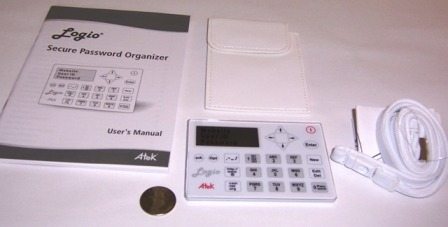
IN THE BOX:
- White Logio Secure Password Organizer
- White carrying pouch
- White lanyard
- Coin cell battery
- Lanyard safety instructions and installation manual
- User’s Manual
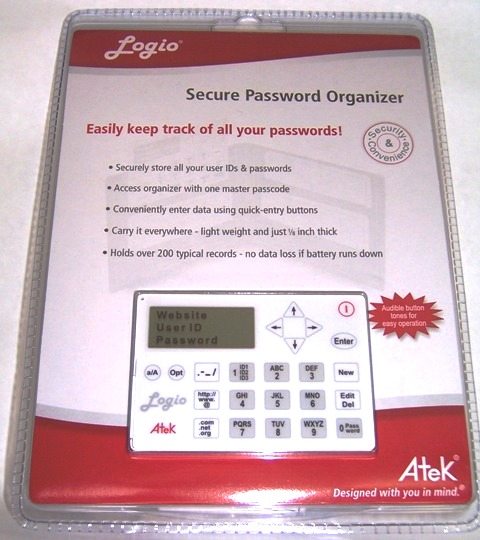
The device is nicely package in a compact, clear blister package. The packaging is rather difficult to get through, even though it has a perforated opening in the rear. If the device provides as much security as the blister pack, it will be a very good investment.
At first touch, the Logio Secure Password Organizer feels more like a cheap novelty item then a robust gadget. Roughly the size of a credit card and constructed of flimsy, thin plastic, it is very light but fails to pass the creak and crackle test on nearly every touch. I am not sure this unit will be able to survive much wear and tear.

The functional layout of the device is very straightforward, in that all the buttons are on the front-face of the device. Twenty-three buttons comprise all of the user options. The alpha-numeric keys are just like the ones on a standard phone. The number 2 button is also “ABC”, 3 is “DEF”……9 is “WXYZ”. This gives all the alpha-numeric options with ten buttons. The negative is it can take multiple presses for some letters. For instance, “S” and “Z” both require users to hit the button four times. To enter the “7″ or “9″ requires five times.
The alpha-numeric buttons are surrounded by miscellaneous buttons. Two of these buttons are dedicated for the routine text and symbols that you might need to track for web sites passwords, “http://, www., @” and “.com, .net, .org”. Added convenience for the user although I am not sure I would really need the “http://” as I tend to just record site information without the preface.
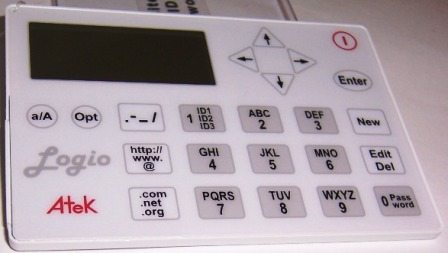
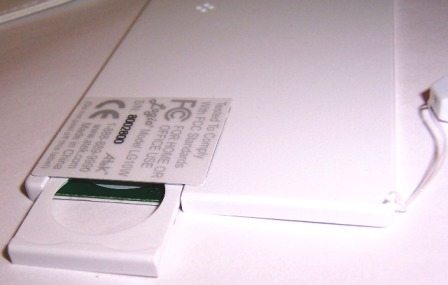
I inserted the CR2016 coin cell battery via the slide load mechanism located on the left side of the device and powered it up by pressing the power button in the upper right corner. Immediately I stepped back into time. Into the time of dot matrix computer screens. The screen lacks any backlight and I found that I had to adjust the contrast to the highest setting to see the display.
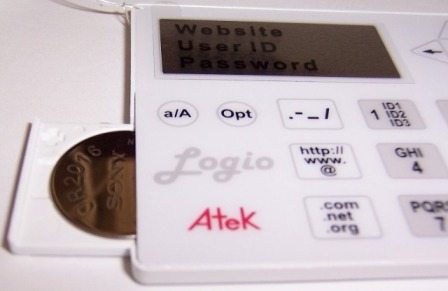
One of the first steps of the initial set-up is to establish a master password which is 8 to 15 characters in length and is only numbers, no letters. It is critical to remember this password because there is no method to reset and recover if you lose/forget it. I know this is for security purposes but users really need to make sure their master password is something they easily remember or the device can become worthless.
Other initial set-up steps include lost and found information (name & phone number), tone volume, auto-off time and contrast level. The set-up also provides users with the options of storing up to three commonly used user ids. So if you normally use “1CoolDude” as your username when creating an account, you can save that id and you will not have to type it in every time you create a new username/password account. That is pretty cool.
I selected ten accounts and decided to load them in. Unfortunately, that is where my disappointment started. Manipulating the keypad to enter account information is not easy, to say the least. I had difficulty, especially when I made a typing mistake. Not easy to fix. First you have to maneuver to the incorrect letter or number, once it is flashing you press the “Edit, Del” key. Not like your expectations from a standard keyboard operation.
I should have known that the Atek Logio Secure Password Organizer was not going to be as easy to operate as I had hoped when I noticed the user manual was 55 pages in length. YIKES!
To make it worse, the device would sporadically turn itself off. I thought it might be a bad battery, so I bought a new one and installed it but the failure mode persisted throughout the review. I never could determine the failure mode that caused it shut down but it definitely made it more difficult to complete the review.
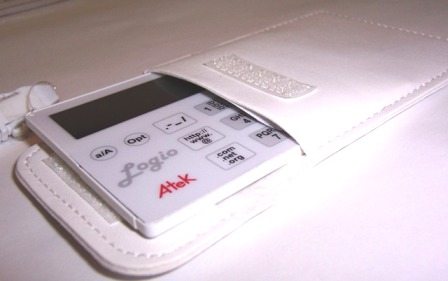
The accessories include a leather carrying pouch with soft plush lining to protect the device. As I mentioned previously, touching this device makes you believe you need a Hummer to protect it from shattering into a million tiny pieces.
The included lanyard connects to the unit via what looks like fishing line pushed through a tiny pass-through in the upper left corner. Now I know that some fishing line can be very strong but it just looks not expensive and not durable.

In conclusion, the premise behind the Atek Logio Secure Password Organizer is sound and I am sure that there is a huge consumer market for a reliable tool to help manage passwords. The compact size, ability to store your 3 favorite usernames, not losing data when the battery is removed and dedicated buttons for commonly entered text are the biggest positives from the device.
Unfortunately there are some definite negatives that outweigh the positives. The biggest is probably the impression of inexpensive manufacturing. In other words, it feel cheap. There were times when I was using the keypad that I was concerned I might press too hard and shatter the unit into pieces. That might have been a factor in why the unit I utilized for this review kept sporadically shutting down. I might have pressed hard enough to break something internally.
I found it difficult to use (remember the user manual is 55 pages long) and the old school dot matrix display without any backlighting is horrible. Considering it all, I would not recommend the Atek Logio Secure Password Organizer as a password management solution. Looks like my Palm V will survive another day.
Those of you old enough to remember the early days of portable phones probably have plenty of memories. And the memories that don’t involve watching Voltron after school probably include getting that phone call from a friend or relative that started with “Hey! You won’t believe where I’m calling you from!” The Philips BTM630/37 Docking Entertainment System opens up this feeling for a whole new generation. With the built-in microphone and Bluetooth compatibility, it’s finally possible to make phone calls through a stereo. Welcome to the future, everybody! When you’re not doing that, you’ll be able to enjoy all types of music, from iPods to AM/FM radio. If you’ve got the old style iPod or iPhone, you can charge it up while you listen. If you don’t, you can use the 3.5mm jack, There’s also a USB port, an SD/MMC card slot, and a CD player that can even rip CDs. No need to boot the computer just to get that one track! Really, though, there’s only one solid reason to buy the Philips BTM630/37 Docking Entertainment System. The two seconds of amazement that will come from saying “No, man, I’ll calling you through my stereo system!” That’s even better than that time they killed Sven. You were born to die, brother. Warranty: 1 Year Philips Features: Specifications: Audio Playback Audio Recording Sound Tuner/Reception/Transmission Convenience Power Dimensions iPod Compatibility: In the box:
Connectivity
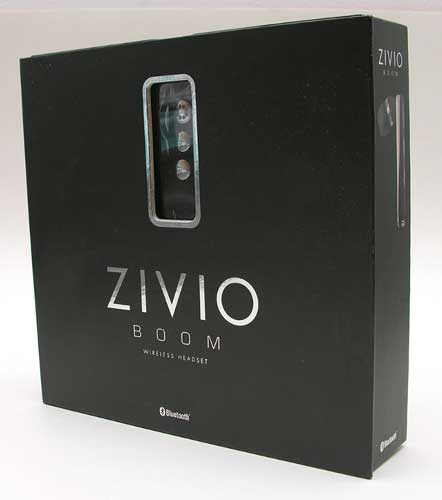
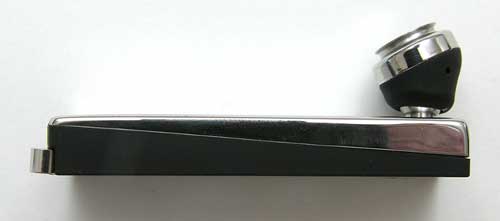
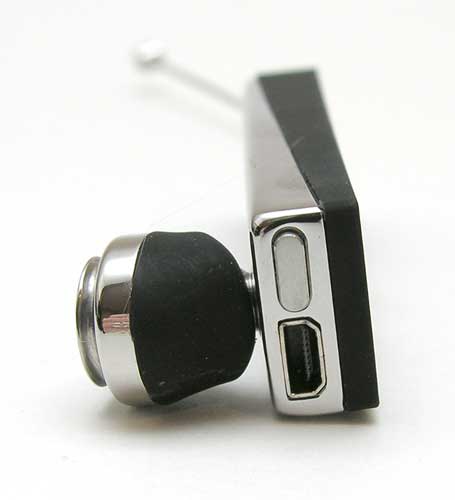
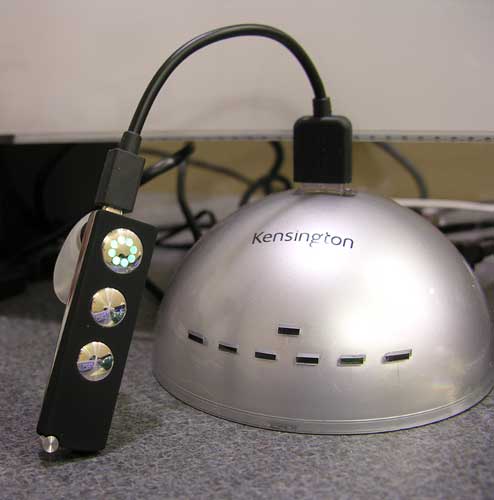
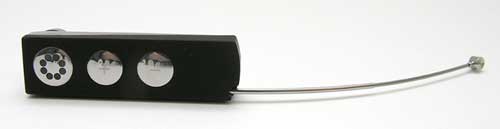
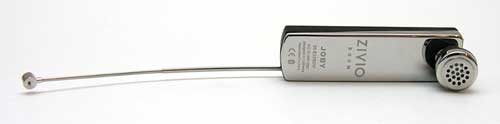
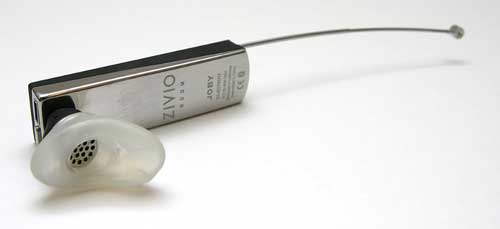
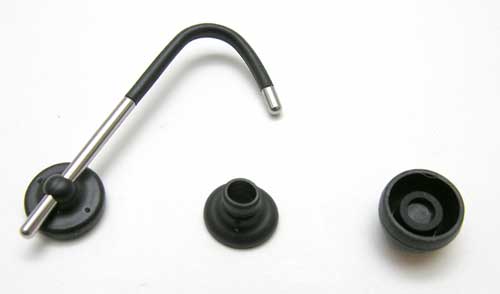
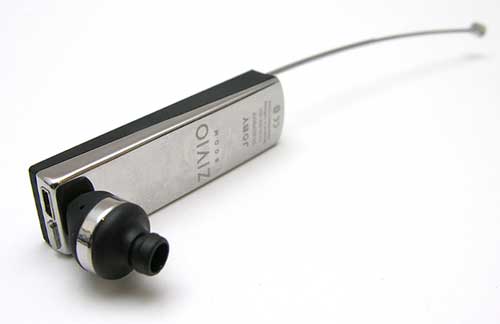
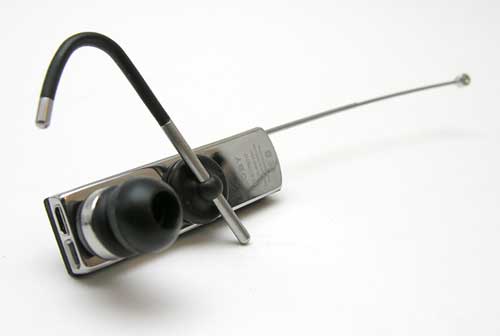
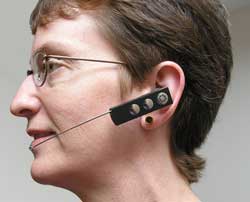
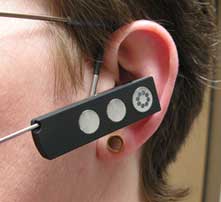
I remember first seeing the Zivio Boom Bluetooth wireless headset at the 2008 Macworld Expo and thinking that it looked pretty sexy, but I wasn’t sure about the practicality of the telescoping boom microphone. It’s now one year later and they’ve sent me one to review. Let’s take a closer look. Bluetooth Version 2.1 + EDR and Multipoint Zivio Bluetooth headset My first impression of the Zivio was that it looked very Apple-esqe with its Black and chrome design. I think it has a cool tech fashion style with crisp edges and modern geometric touches in the buttons and LEDs. The outside surface has a slightly rubberized texture that feels soft to the touch. There are three buttons on the outside. The one closest to the back edge is the call answer / end button. This button (called the Joby button) has a circular pattern of LEDs that shows the status of the battery and pairing mode. It will also blink every 5 seconds to indicate that it is powered on. The + and - buttons allow you to adjust the volume. Pressing both volume buttons at the same time will toggle mute on and off. All three buttons have good tactile feedback. The earphone is located on the other side. It can swivel on its base to allow for a more customized fit. The power button and charging connector are located on the back end of the headset. The headset charges through a special USB cable that can be plugged into your computer, or into the included AC adapter. The Joby button will glow Red while the headset is charging. When charging is completed, the Joby button will glow Green. The main unique feature of the Zivio is the telescoping boom microphone. The boom is relatively easy to extend and collapse. I do have some fear that the boom could break after repeated use. It is made from really thin metal tubes. Although you can use this headset without extending the boom, the sound quality (for people on the other end of your conversations) will be better when you take advantage of this feature. Zivio offers several ways to wear this headset. They include three gel style ear pieces that will allow you to quickly insert and remote the headset from your ear. These ear pieces are soft and pretty comfortable. If you prefer using an ear hook, Zivio includes a magnetic ear hook and a snap on adapter that is used with what they call mushroom style ear pieces. The adapter snaps on the ear piece… Then a mushroom ear piece installs over the adapter. Lastly, the magnet ear hook is placed on the metal inside surface of the headset. Since the ear hook is magnetic, you can slide it around where ever works best for you. Here you see me wearing the Zivio with and without the ear hook. I actually prefer not to use the hook with this headset. For me, it takes too long to put on this headset when I’m using the hook. I’ve also pulled the magnetic hook off the headset when I remove it from my ear. Although it’s a cool idea, I’m wondering how many people would really use it on a regular basis. I have had no problems using this headset with a Nokia N85. It paired easily and the audio quality on my side of the calls was outstanding. When calls come in, the ring tone set on the phone plays through the Zivio headset. It also worked well for voice dialing. Accessing the buttons while wearing the headset is pretty easy, but I do wish that they weren’t quite so flat, so that you could feel them through a thin glove. It is Winter right now, so I’m always wearing gloves while driving. Ok, time for the sound tests! Below are several audio clips of the Zivio Boom headset in action. This will give you an idea of what it sounds like to receive a call from someone using this headset. I used the free voicemail / fax service from K7.net for these tests. I signed up for a free account, got a phonenumber and called it using a Nokia N85 while using the Zivio Boom headset. The resulting voicemails are then emailed to you. Pretty nifty! At test time, the phone had full signal strength. Click to listen. zivio-boom-outside (108k .WAV file) zivio-boom-inside (96k .WAV file) zivio-boom-car (68k .WAV file) It’s pretty apparent though these sound bites that the headset sounds much better on the caller’s side of the conversation when the boom is extended. When it is not extended, the audio sound muffled and muddy. Other than wind noise, the headset does well with canceling background noises while driving (road noise, engine noise and radio). I like the Zivio Boom Bluetooth headset because it’s easy to use, easy to charge, looks pretty nice, is comfortable to wear and has good sound quality on both sides of a conversation. That said, I haven’t made up my mind yet if the extendable boom is a great feature, or just a hassle. I’m all about gadgets being fast and easy. So if I have to pick up the headset, extend the boom and then put it on, that’s one extra step that I would not have to do with a regular headset. Am I being too picky? Yeah probably… What do you think? Would you use a Bluetooth headset with an extendable boom?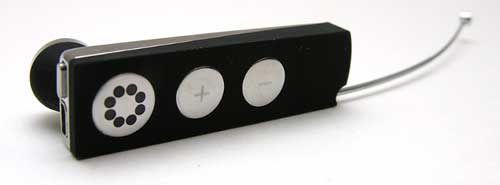
Hardware Specifications
10 m (33 ft) range between phone and headset
Talk time: 10 hours
Standby time: 200 hours
Built-in rechargeable battery
Charging via power adapter or any other standard USB compliant charging device
Power adapter simultaneously charges two USB devices
Size: 53.5 x 15 x 7 mm
Weight: 13 g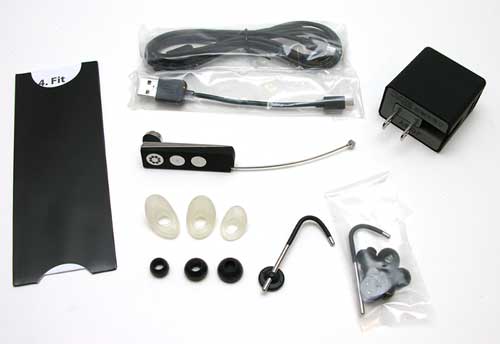
Package Contents
Dual-USB wall charger
2 × USB charging cables
Quick-start pocket guide
Illustrated Manual
2 × magnetic ear loops
3 × scoop style earpieces
6 × mushroom style earpieces
2 × mushroom connectors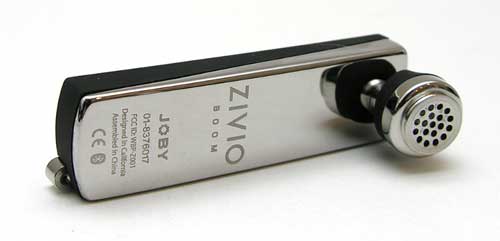
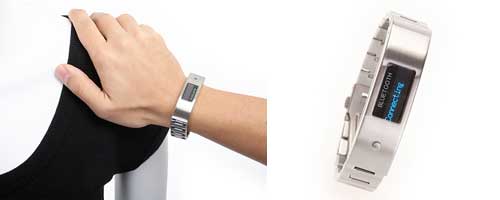
This Bluetooth bracelet from Brando won’t let you miss a call when your phone is buried at the bottom of your purse. It vibrates when a call comes in and will let you answer or reject the call. It also has a Link Loss Alert Function that will cause the bracelet to vibrate when your mobile phon,e is more than 5 Meters apart from you.

If you like 8.9-inch screens, you might want to get one now. Asus has said that it'll be phasing out that size in 2009, since 10-inch models are dominating the market.
According to Digitimes, Benson Lin, president of Asustek Computer's Asia-Pacific division said that 10-inch models account for 95% of the company's sales. 7-inch models make up the other 5%.
To be honest, I'm surprised 8.9-inches is not a popular option. Maybe I'm just weird, but I always though that screen size hit the sweet spot between fitting into a purse and still having a somewhat usable keyboard.
Microsoft Zune 120GB
Posted in 120gb, gadgetguru, microsoftzune, mp3 player, technology, technology news, zune

Microsoft’s fabled Zune line has done a lot of growing up over the years. From the first-gen 30GB player that we scorned back in 2006 to the 8GB model we warmed up to 2007, Microsoft has continually been fine tuning its line of media players to deal with the crush of criticism they’ve met on the open market. That refinement reaches its pinnacle with the 80GB and 120GB players, which are both the largest and most capable Microsoft has ever produced. But are they ready to run alongside Apple’s class-leading iPod yet?


We have reported on the Unibind’s Photobook Creator before, and I seem to recall saying in that review that I would probably report on Unibind again. Sure enough, I have just heard of a brand-new development that Unibind is working on. Unibind’s Photos N Sounds is “the first photo book that allows anyone to record a personalized voice message”. The recording apparatus is on the cover, and it works by hitting a record button and saying the message or music. If the user is satisfied with the message, then he or she rips off a tab to make the audio file permanent. This is perfect for scrapbookers who want to have a personalized message attached to their scrapbooking album. This can also work for businesses who want to put audio to their marketing album/brochures. In addition to the personalized message, Photos N Sounds can play popular theme songs like Christmas carols or the “Happy Birthday” song. I have a little suggestion for Unibind: make it so the user can download an MP3 via USB. I’m sure that Unibind has already thought of that, and I’m certain it is probably more difficult than it sounds. Otherwise, that technology would be out by now.
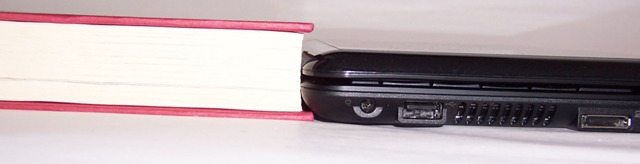
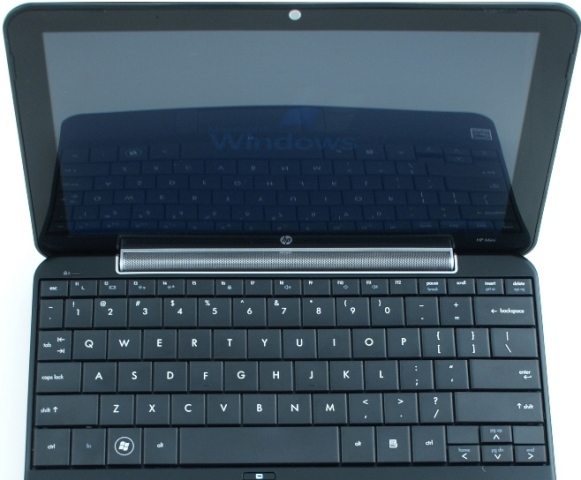
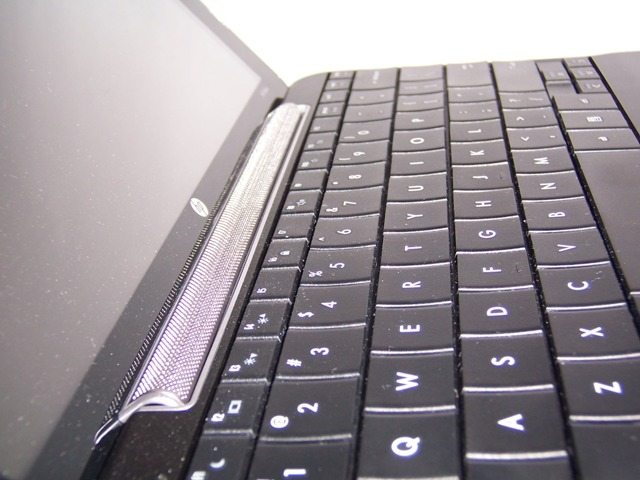
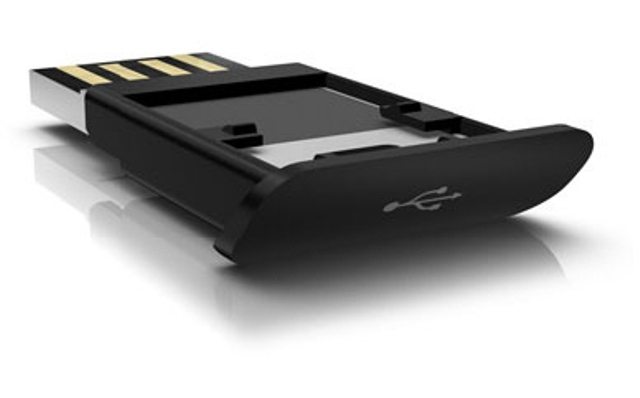
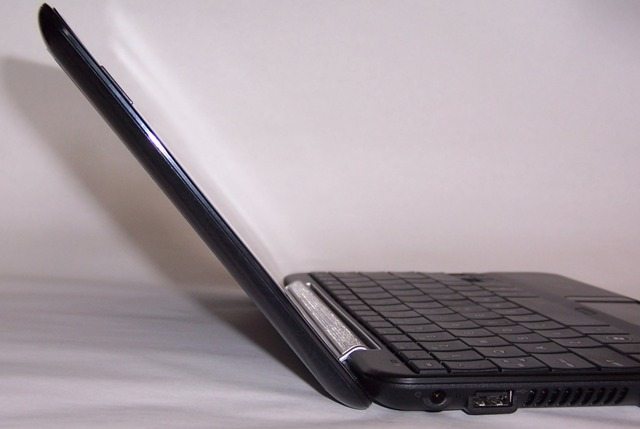
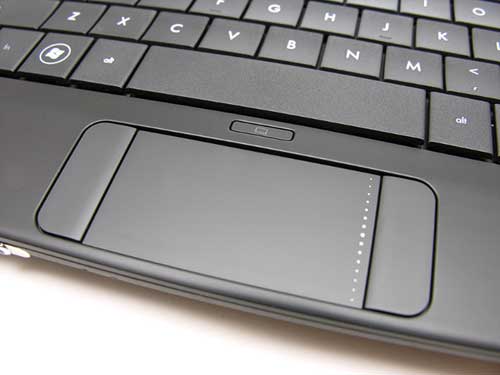
I have to be honest, when Julie communicated to her Gadgeteer Geek Gang that we would all be getting a new HP Mini 1000 XP Series Netbook, I was overcome with a feeling much like when I was a kid at Christmas. You know, that happy/joyous feeling of anticipation that fills the youthful spirit until the climax of ripping through the paper on the very last gift. Fortunately, I have been using my HP Mini for a few weeks now and that warm and fuzzy feeling has yet to wear off. I love it, almost completely. I know that is too vague, so specifically: I love the small, sleek and ultra-lightweight design. At just under an inch thick and slightly more than two pounds, it is comparable in size to a standard hardcover book. Very easy to carry in a bag, a medium/large purse or comfortably in your hand. The 10.3 x 6.5 x 0.9 plastic shell, which differs from the aluminum case used in the previous model, seems fairly sturdy, passing my creak/pop test. I am sure the switch from aluminum to plastic was done to reduce manufacturing cost and weight. I love the stylish design. The onyx-toned “Swirl” Imprint design is subtle but provides a certain alluring characteristic to the exterior. The groovy pattern bestows depth to what would be a rather plain glossy exterior. If you really want your Mini to make a less subtle statement, check out the Mini 1000 Vivienne Tam Edition. I love that the keyboard is nearly full-sized. One of my primary concerns when I considered the size of the device was would I be able to easily type on the keyboard. Well yes, I can easily utilize the Mini’s keyboard without hunting and pecking. HP boasts the keyboard is “92% of the standard size”. Nice to see the engineers did not compromise usability for the sake of size. I think the keyboard, with its over-sized square keys stretching from edge-to-edge, is the biggest selling point for the unit. I love that the screen is appropriately size and bright. My second biggest concern was the screen. Would it be big enough for me to use without straining my eyes? Would it be bright enough for me to see? The upgraded 10.2″ diagonal screen is nicely sized proportionally with the overall unit and the HP LED Brightview Infinity Display (1024 x 600) puts out plenty of light. I used the device for hours and never noticed any strain on my eyes. I love the fact that HP did not fill the netbook with a lot of unnecessary pre-loaded software. Netbooks were designed to be highly mobile and offer enough computing power to complete the elementary tasks, such as surfing the Web, working on documents and some fundamental multimedia playback. HP ensures that the basic are covered with Microsoft Works, Windows Internet Explorer and Windows Media Player loaded on Windows XP Home edition. I must admit that I am not a big Works fan but you can easily replace that with the basic Office tool set. I love the battery life. I was expecting to get 2 hours max out of the 3 Cell I love the sound quality. Again, I think more times then not we often expect small speakers system to lack anything near a decent sound. Fortunately I found the HP Mini 1000 did not comply with that stereotype. The unit delivers above average sound quality without experiencing any noticeable distortion. The engineers ingeniously placed the speaker as the inside hinge, saving space and providing a perfect position for the tunes to flow. I love the built-in SD card reader. Great way to easily add some memory to your device. For less than $30, you can easily add 4GB of storage with a SD card. I filled a card with my favorite MP3’s and I had my music in my Mini without eating up hard drive space. Just like any real relationship, we have our dislikes too: I hate the idea behind the Mini Mobile Drive. The Mobile Drive is HP’s proprietary hardware, like a small jump drive, that fits into the recessed USB port on the unit’s right side. I love the concept of additional memory options but to make it a proprietary piece that you have to buy as an extra leaves a bad taste in my mouth. At this time, the Mini Mobile Drives are not available so I am unsure of the cost. I hate the glare from the overly glossy LCD screen. I tried to use the unit outside once and the glare made it impossible to see anything. This is opposite edge of the nice and crisp picture that I loved above. If the manufacturer would have included a anti-glare screen, I assume the brightness would have been compromised. I hate the audio out (headphone) and audio in (microphone) share a single audio jack. I experienced no issue with the shared audio connector but I just think that it might have made more sense to leave the proprietary slot on the drawing board and give each audio option there own jack. I hate the limited angle of the screen. Occasionally I prefer to work while standing standing up at our kitchen island. To do this comfortably, I normally will extend the screen open to an extreme angle, almost parallel to the counter top. Unfortunately, the Mini will not permit me to open it very far. I hate the Synaptics Touchpad. I found using the touchpad with the buttons flanking each side difficult to maneuver for navigation. Maybe this is more from my experience with my Dell’s mouse ball set in the keyboard but it definitely took me some time to become proficient. The technique that I most often use is putting my thumbs on the bottom of the device and use my pointer fingers to direct the movement of the mouse. I hate the built-in WebCam. The concept of including peripherals that are built into the frame of the hardware is great. Unfortunately, the picture quality captured from the camera is fair, at best. Regardless of the lighting, I was unable to improve the quality. Now that you understand the spectrum of emotions that I have felt using my HP Mini 1000, I hope that you can understand its impact on my domicile. Normally, my family is uninterested in the gadgets that I review. They are usually interested for the first 5-15 minutes of me opening the box, then their interests wanes like ice cream on a August day in Indiana. Unfortunately this was not the case with the netbook. My wife was instantly drawn in by the look and feel of the HP Mini. The sleek, stylish and lightweight device instantly grabbed her attention and once I completed the initial set-up, including the establishing the wireless connection, I started to notice the Mini and my wife became very close friends. It started with a simple “let me see that for a second”, and she would take it and check her Facebook account and be done with it in 15 minutes. No harm, no foul. Then slowly I started to witness a shift, she would take the Mini with her upstairs and sit in bed and surf the net. After the girls went to bed, she would wrap herself in the warmth of a blanket with the Mini nestled in her lap. Now it is to the point where I feel like I have been knocked down the ladder of love. Our girls still command the most attention from her but I have been replaced by the Mini. It is like the device is connected to her hip by some type of electrical umbilical cord. I have to ask permission to use it so that I can get data to write an educated review and even then she acts as if it in a inconvenience. I almost anticipated my wife’s obsession but my two little girls forced me to do a “say what” double-take. They are less than six years old and the HP Mini 1000’s small size drew them to it like moths to a light. They thought it was one of their toy laptop computers and to be honest it is actually smaller then their play laptops. They both asked a few times if they “could play with daddy’s new toy”. Interestingly side note, I was discussing this phenomenon with my mother-in-law, who happens to work for an Indiana school corporation, and she was telling me that they recently purchased HP Minis for their second grade student population. When I was seven years old and in second grade I know that me and my peers did not have access to anything close to a computer or anything nearly as cool as these little babies. In conclusion, just like any natural relationship my HP Mini 1000 and I have our ups and downs but in the end I definitely felt the love. The small, stylish design and the nicely sized keyboard are the two biggest selling points of the netbook, while the glare from the super glossy screen and the touchpad are the major deterring factors. Overall, I would definitely purchase a HP Mini 1000 if you are looking for a nice, small netbook that offers great options for the highly mobile user. Even if mobile is define as moving in between rooms in your house. My only reservation is that you might want to consider buying more than one or you will find yourself in a situation similar to mine where you have to fight your love ones for the opportunity to utilize this great little device. Gotta go, my wife needs to spend some quality time with the Mini that I am using to write this review.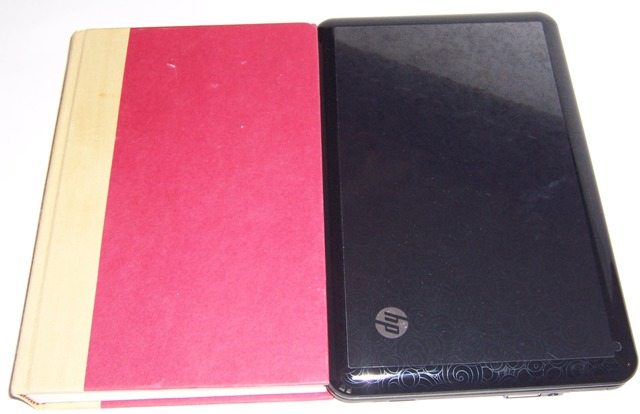

The FinePix Z33WP from Fujifilm is pretty much the same asthe Z30 digital camera the company announced Tuesday as well. The key difference being the Z33WP is waterproof down to 10 feet. What's nice is the extra protection only adds $20 to the price. The 10-megapixel camera also features a 2.7-inch LCD and 3X optical zoom with shooting options including face detection, automatic scene recognition, a Blog Mode that automatically resizes things for Web sharing, and separate still photo and movie shutter buttons. The camera, available in green, pink, and black, hits stores in late March for $199.95.
The 10-megapixel Fujifilm FinePix Z30. It is for the most part a fairly basic ultracompact camera with a 3X optical zoom and 2.7-inch LCD. But along with its interesting looks there are a couple other extras to make it stand out from other youth-oriented models. For example, you get face detection and automatic scene recognition to help with fast shooting, but there's also a Blog Mode (a carryover from the Z20fd), which apparently preps shots and video so they can go right online for sharing. There are separate buttons for the still photo shutter release and movie record taking away the need to switch to a different mode to do one or the other. Also, small movie clips can be stitched together in camera to create a single, 60-second clip. On-the-go fashionistas will be able to pick one up for $179.95 in pink, orange, and black this March.
Low-end cameras are rarely exciting, but Fujifilm is giving it a shot anyway with the FinePix J20fd and J250. Both are 10-megapixel ultracompacts with automatic scene recognition, face detection, sensitivity up to ISO 1600 at full resolution, and image stabilization--mechanical- and ISO-based for the J250, ISO-based only in the J20fd. That of course isn't where the differences end. The J20fd is the more basic of the two, providing a 2.7-inch LCD and 3X optical zoom, while the J250 has a 3.0-inch LCD and a wide-angle 28mm lens with a 5X zoom. Available in March 2009, the J20fd will be available in black or silver versions for $129.95, and the fuller-featured J250 is $199.95 and comes in black only.
